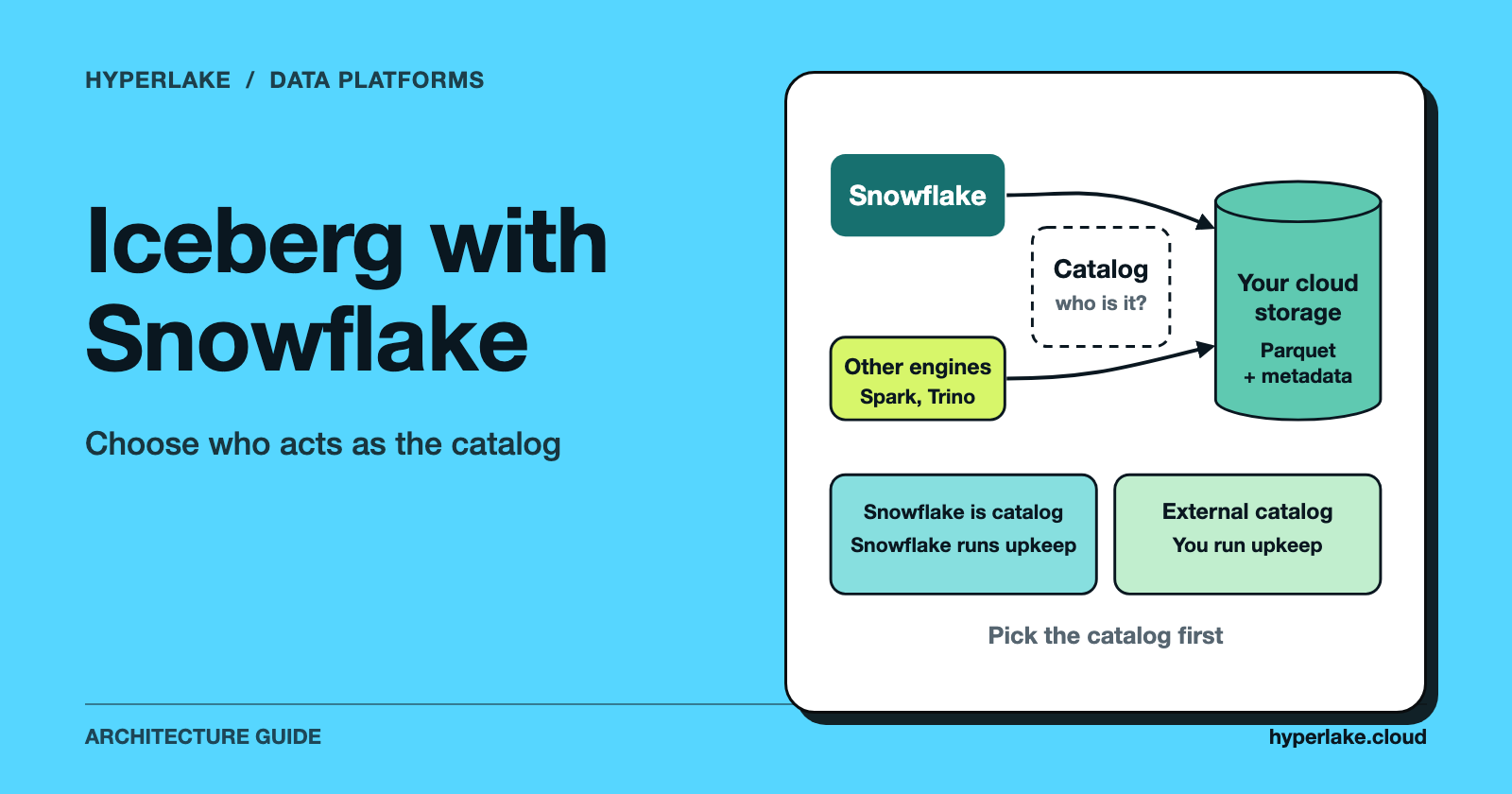
Snowflake can create, read and write Apache Iceberg tables. When using Apache Iceberg with Snowflake, the design choice that matters is who acts as the catalog. Make Snowflake the catalog and you get full read and write support, with Snowflake running maintenance such as compaction. Use an external catalog and other engines stay in charge of the table, Snowflake's platform support is more limited, and maintenance is yours. Either way, the data sits in Parquet files you can keep in your own cloud storage.
We make HyperLake, a sovereign AI operating platform that uses Iceberg with open query engines. It isn't a Snowflake feature or a Snowflake replacement, and the section on where it fits says exactly where it applies.

What does it mean to use Iceberg with Snowflake?
Apache Iceberg calls itself an open table format for analytic datasets. It's designed so engines such as Spark, Trino, Flink, Presto, Hive and Impala can work safely with the same tables at the same time. New to the format? Start with Apache Iceberg: ACID Tables, Snapshots, and Time Travel.
According to Snowflake's documentation, Iceberg tables combine the performance and query semantics of typical Snowflake tables with external cloud storage that you manage. They use the Iceberg format with Parquet data files. What that means in practice: your table files aren't locked inside Snowflake's internal storage format any more, so a second engine can, in principle, read the same data without a copy.
Three Snowflake concepts shape every design:
- External volume. A named, account-level Snowflake object that connects Snowflake to your cloud storage (Amazon S3, Google Cloud Storage or Azure Storage). One volume can serve several tables.
- Catalog. The component that tracks which metadata file is the current version of each table. Snowflake can be the catalog, or it can use an external one.
- Catalog integration. An account-level object describing how metadata for externally cataloged tables is organised. Snowflake's docs describe it as required for externally cataloged tables, and you don't specify one when Snowflake is the catalog.
Snowflake-managed or externally managed: which catalog should you pick?
This is the trade-off everything else hangs on. The table sums up the documented differences as of October 2026. Check the Snowflake Iceberg documentation for your account before relying on it.
| Question | Snowflake as catalog | External catalog |
|---|---|---|
| Platform support | Full Snowflake support | Limited Snowflake support |
| Who maintains the table | Snowflake (for example compaction) | You, with an external engine |
| Reading | Supported | Supported |
| Writing | Snowflake can write | Writes go through a REST catalog |
| Clustering | Supported | Not supported |
Snowflake describes the Snowflake-managed option as providing full platform support with read and write access, with lifecycle maintenance such as compaction handled for you. For externally managed tables, it states that Snowflake does not assume any life-cycle management on the table.
Some details that matter in practice, all from Snowflake's own pages:
- Third-party clients can't append to, delete from or upsert data to Iceberg tables that use Snowflake as the catalog. Outside engines read; Snowflake writes.
- External engines can read Snowflake-managed tables through Snowflake's Horizon Catalog.
- Externally managed tables can be converted to Snowflake-managed tables.
- Snowflake supports Iceberg format versions 1, 2 and 3, with exceptions listed in the docs.
How does the architecture look in each mode?
Snowflake as the catalog
Snowflake writes data and Iceberg metadata to a location on your external volume, or to Snowflake-provided storage if you use the reserved value SNOWFLAKE_MANAGED. Other engines can read the tables through the catalog interfaces Snowflake exposes. They're consumers, though.
Here's an illustration based on the syntax in Snowflake's CREATE ICEBERG TABLE reference. The names are placeholders.
-- Illustration: a Snowflake-managed Iceberg table on your own storage
CREATE ICEBERG TABLE my_iceberg_table (amount INT)
  CATALOG = 'SNOWFLAKE'
  EXTERNAL_VOLUME = 'my_external_volume'
  BASE_LOCATION = 'my_iceberg_table';
Snowflake notes that BASE_LOCATION can't be changed once the table exists, so plan your storage layout first.
An external catalog
In this mode another system, such as an Iceberg REST catalog, owns the table and Snowflake attaches to it. Snowflake documents catalog integrations for AWS Glue, Iceberg REST catalogs, object storage metadata files and Snowflake Open Catalog. The sketch below follows the REST catalog reference and is also an illustration.
-- Illustration: a table owned by an external REST catalog
CREATE ICEBERG TABLE my_iceberg_table
  EXTERNAL_VOLUME = 'my_external_volume'
  CATALOG = 'my_rest_catalog_integration'
  CATALOG_TABLE_NAME = 'my_remote_table'
  AUTO_REFRESH = TRUE;
AUTO_REFRESH defaults to false. Set it to true and Snowflake polls the catalog for metadata updates every 30 seconds, unless the catalog integration sets another interval. Leave it off and you run refreshes yourself.
Catalog-linked databases
With lots of tables in a remote REST catalog, Snowflake's catalog-linked database feature connects a whole database to it, so you don't define tables one at a time. Snowflake polls the remote catalog (every 30 seconds by default) and shows namespaces as schemas with tables under them. It doesn't sync access control for users or roles, so you manage permissions separately on each side.
What are the trade-offs and limits of Iceberg on Snowflake?
Picking Iceberg doesn't mean everything Snowflake offers comes along. These are the documented points that most often shape a design.
Maintenance moves to you with an external catalog. Snowflake states it doesn't perform maintenance operations on externally managed Iceberg tables. An external engine has to expire snapshots, remove old metadata files and compact data files, and you should refresh Snowflake after each maintenance run so the two stay in step. For Snowflake-managed tables, data compaction is on by default and billable, and you can turn it off.
Externally managed tables have feature gaps. Snowflake lists no cloning, no clustering, no standard or append-only streams (insert-only streams are supported), no replication and no Snowflake schema evolution for them.
Some gaps hit all Iceberg tables. Hybrid tables and temporary tables aren't supported. Fail-safe doesn't apply to tables on customer-managed external volumes, so recovery there is on you.
Watch for orphan files. Failed writes can leave Parquet files that no metadata tracks. For Snowflake-managed tables, Snowflake doesn't delete them automatically, so unused files may pile up in your storage.
Cross-region and cross-cloud access works, but Snowflake notes it can incur egress costs. Our suggestion: keep the external volume in the same cloud and region as your Snowflake account unless you have a real reason not to.
Check delete handling. Snowflake supports position deletes for v2 tables and deletion vectors for v3 tables. For external engines it lists no equality deletes, so find out what your writing engine produces.
And mind the catalog direction. For Snowflake Open Catalog, Snowflake's Open Catalog page says tables synced from Snowflake are read-only there, and that Snowflake can query but can't write to tables managed by Open Catalog (Snowflake's main Iceberg page words this differently, so confirm in your account). The Open Catalog page also says new customers should use Snowflake Horizon Catalog for Iceberg tables and multi-engine interoperability.
When does Iceberg on Snowflake make sense?
Treat this as a starting rule and test it against your own workloads.
- Snowflake is your main engine and you want open files on storage you control: make Snowflake the catalog. You keep full platform support and give other engines read access.
- Another engine, such as Spark or Trino, writes the data and Snowflake is one consumer: use an external catalog, and budget for refresh and maintenance.
- You mostly need warehouse features like cloning and replication: native Snowflake tables may suit you better, since several of these aren't available on externally managed Iceberg tables.
- You need a second engine that writes: check the catalog direction before you commit. A Snowflake-managed table rules out third-party writes.
For the wider format choice, see Apache Iceberg vs. Delta Lake: How to Choose. For how the pieces fit with no warehouse at the centre, see What Does an Open-Source Data Lakehouse Stack Look Like? and Data Lakehouse Architecture: The Four Layers.
Where does HyperLake fit?
HyperLake doesn't integrate Snowflake for you, and this article doesn't claim it does. If you've picked Snowflake as your warehouse, the choices above get made in Snowflake. HyperLake is relevant if you want Iceberg tables on object storage, queried by open engines, in an environment you control. According to HyperLake's product description, its data foundation uses Iceberg and Trino for lakehouse analytics, among other engines chosen by the workload. It runs in your own cloud account on AWS and Google Cloud today, with private cloud and on-premises deployments coming soon. People and agents reach data through authenticated, governed services, with policy decisions made by OPA.
If all you need is a managed cloud warehouse with minimal operations, a platform like this adds work you don't need. If you're weighing alternatives for control or location reasons, see Snowflake alternatives that run on-premises in 2026.
Frequently asked questions
Does Snowflake support Apache Iceberg?
It does. Snowflake documents Iceberg tables that use the Iceberg format with Parquet files, support Iceberg format versions 1, 2 and 3 (with exceptions), and can be either Snowflake-managed or externally managed.
Can Snowflake write to Iceberg tables?
Yes, within limits. Snowflake can write to tables where it's the catalog, and for externally managed tables, writes go through a REST catalog. Snowflake's Open Catalog page says it can query but not write to tables managed by Open Catalog, so confirm current behaviour in your account.
Can other engines such as Spark or Trino read Snowflake Iceberg tables?
According to Snowflake, external query engines can read Snowflake-managed tables through Horizon Catalog. Third-party clients can't append, delete or upsert on those tables.
What is the difference between Snowflake-managed and externally managed Iceberg tables?
It's about who owns the table. With Snowflake-managed tables, Snowflake is the catalog, gives full platform support and runs maintenance. With externally managed tables, an outside catalog owns the table, Snowflake's support is limited and maintenance falls to you.
Do I need an external volume?
Snowflake uses an external volume to connect to your own S3, Google Cloud Storage or Azure storage. It also offers the reserved SNOWFLAKE_MANAGED value if you'd rather use Snowflake-provided storage.
Do Iceberg tables in Snowflake cost more?
Snowflake's docs describe billable items such as data compaction on Snowflake-managed tables and egress for cross-region access, while storage on customer-managed volumes is billed by your cloud provider. We don't quote prices, so check your own account's billing views.